






Global Accessibility Awareness Day: Digital Design for Everyone. Authored by Kleinfelder External Communications Lead Rebecca McElhatten.

Rebecca McElhatten
External Communications Lead
Global Accessibility Awareness Day (GAAD), observed Thursday, May 21, 2026 focuses on the intersection of the digital world and more than 1 billion people worldwide with disabilities. Now in its 15th year, GAAD grew from a single blog post into an international day of action and reflection for individuals working across platforms in the digital environment. Professionals across communications, web development, social media, marketing, information technology, and a host of other fields work to make digital content more accessible for all people, including those with hearing, vision, mobility/dexterity, and cognitive disabilities.
Just as building codes and roadway design include standards to make facilities and transit accessible, the digital landscape has its own features that aim to expand access to everyone.
When we think of the physical world, it’s often easy to see or experience accessibility features such as curb cuts with ramps, braille signage, elevators, or headphone jacks at kiosks. We may even benefit from these features in situations such as using an elevator while carrying a heavy package, or using a curb ramp when rolling a suitcase. Digital accessibility features can be less obvious to spot because we experience them in different ways, but good digital practices also benefit everyone.
Closed captions on videos and predictive text are two great examples of accessibility features. Have you ever tried watching a video without closed captions on a busy subway train? Or perhaps you’ve tried typing a message on your smartphone while holding a dog leash in the opposite hand? In these situations, closed captions and predictive text were probably quite helpful, and you may not have realized that both are digital accessibility features, originally intended for the deaf community and assistive communication devices.
With more than 15% of individuals worldwide experiencing a disability at some point in their lives, digital accessibility is also a good business practice. It enhances trust and credibility, and can grow a business’s reach to more potential customers.
Website Accessibility
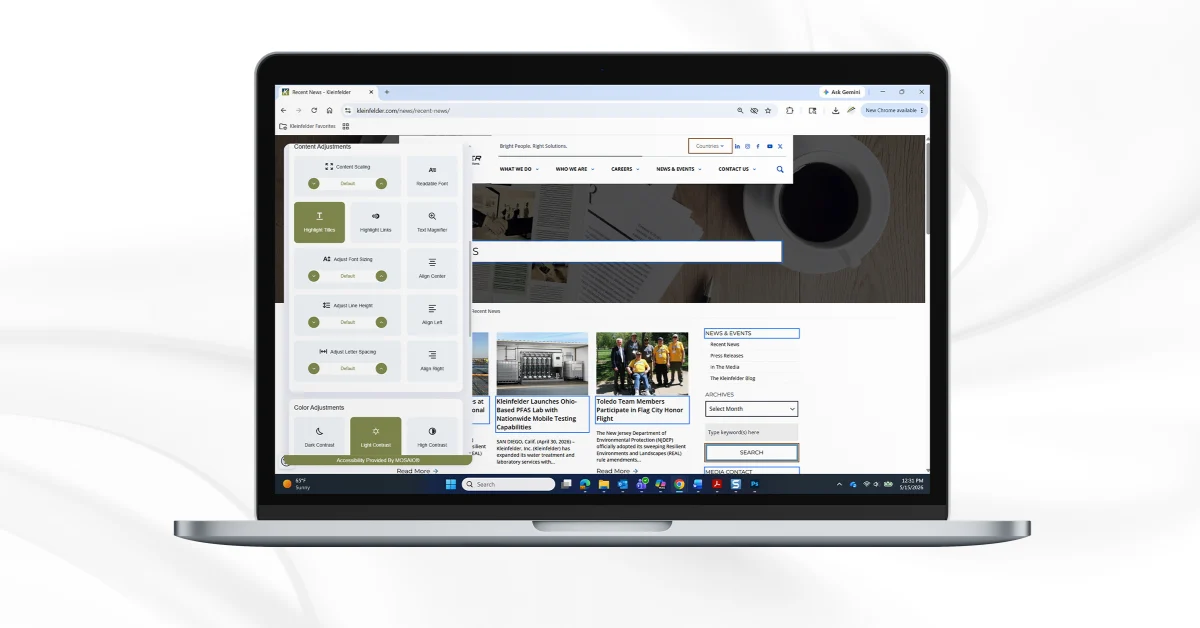
Website accessibility is one way that we support expanded access at Kleinfelder. Through accessibility tools available on our external websites, each website user can tailor their website experience to their individual needs. We offer standard profiles, including seizure-safe mode, vision-impaired profile, ADHD-friendly profile, and a cognitive disability profile, along with modes that work with keyboard navigation and screen readers. Users can select these ready-made profiles or choose to adjust individual items like letter spacing, fonts, text colors, animations, and even the cursor style while browsing.
Want to take these accessibility features for a spin? Check out websites across the Kleinfelder family:
Accessibility in Digital Documents
Another resource we have built-in to our environment at Kleinfelder is access to Microsoft’s in-app accessibility checkers and online resources. Microsoft embeds accessibility tools directly into its core 365 apps, Word, PowerPoint, Excel, and Outlook, through an accessibility checker that identifies issues, explains their impact, and recommends fixes in real time. Complementing this are built‑in features such as live captions, reading order tools, and immersive reading experiences that help ensure content is usable by everyone. Together, these capabilities help us to create more accessible, user-friendly communications by default.
Adobe Acrobat’s accessibility checker is a built-in tool that scans PDF documents to identify elements that may not meet accessibility standards, such as missing alt text (alternative text, or a short, written description added to images and graphics in HTML code so screen readers can describe them), poor reading order, or lack of proper headings. It generates a report highlighting issues and provides explanations and fixes directly within Acrobat, helping to increase compatibility with screen readers and assistive technologies.
Design as a Measure of Quality
Accessibility in digital design is a core measure of quality because it is directly tied to how a website or document works for all users:
- A website or document that only works for users without disabilities is functionally incomplete
- Features like clear navigation, readable text, and keyboard support improve experiences for everyone
- Accessible products behave more predictably across devices, contexts, and human differences
- Meeting accessibility standards demonstrates engineering and design maturity and increased knowledge
- Frustration from inaccessible interfaces damages trust and brand perception
If users can’t access it, it doesn’t work. If it doesn’t work, it isn’t high quality.
As needs change and technology evolves, accessibility should continue to be a measure of quality and success. When we design a world meant to work for all people, everyone benefits.